One script tag
Add the widget once, just before
</body> in the layout every page shares. It works with any web app: React, Vue, Svelte, Next.js, a server-rendered template or plain HTML.html
The script loads asynchronously, so it never blocks your page. With a bundler, install the
agentback package and call createFeedbackWidget instead. The web widget guide has every option.What people see
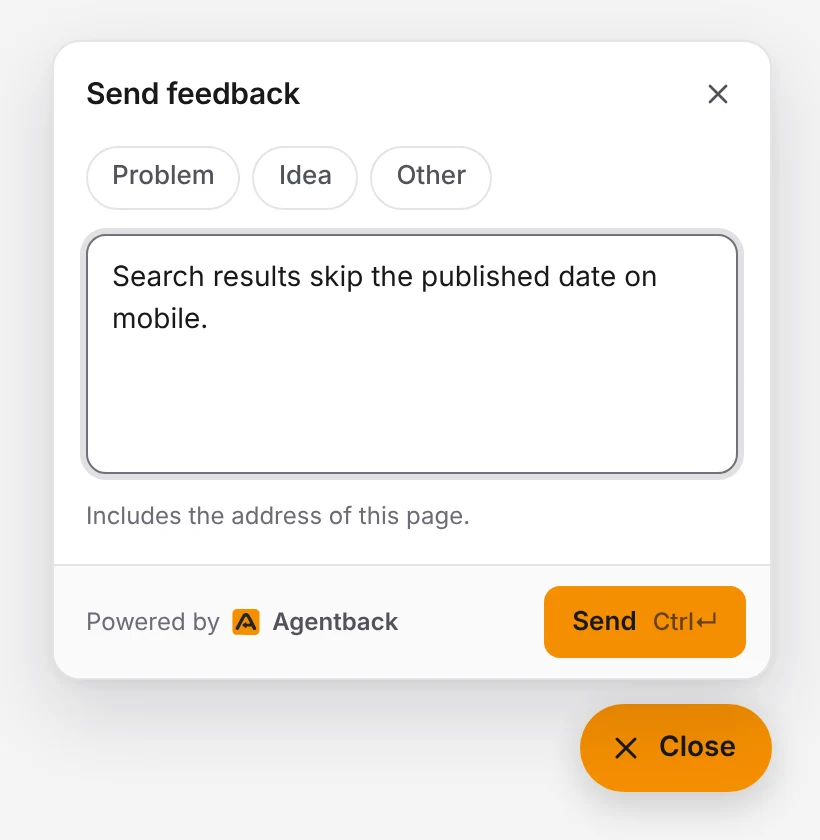
A Feedback button opens a small panel. People pick a type (a problem, an idea, or something else), write what happened, and send. The panel follows their light or dark setting, uses your page's font, and works in English and Chinese.
Every report carries the address of the page it came from, so you know where the problem is without asking.
What you get
- One inbox. Reports arrive as new. Move them to in progress, resolved or ignored.
- Email when it matters. Instant notices, plus daily and weekly summaries, switched per project.
- Who sent it. Pass a signed account ID once someone signs in, and each report shows the verified account. See verified accounts.
- Your coding agent on triage. Connect Claude Code, Cursor or Codex to Agentback's MCP server and ask it to sum up the week or fix the top problems.
Feedback from people and agents in one place
AI agents use your product too: through your API, your MCP server or your CLI. They hit the same bugs and missing features as the people in your web app, but they rarely tell anyone. Agentback collects both in the same inbox. Add a
send_feedback tool to your MCP server or a feedback command to your CLI, and agent reports sit next to the ones from your widget, each marked with where it came from.Make it yours
| Need | How |
|---|---|
| Match your brand | data-color with neutral, blue, violet or a hex colour |
| Open it from your own menu | data-launcher="false" and data-agentback-open on your menu item |
| Follow your app's theme switch | data-theme, and Agentback.setTheme() when it changes |
| Rename or hide the feedback types | data-categories |
| Pick the language | data-locale with en or zh; it defaults to the page's lang |
Safe to ship
The project key in the script tag can only submit reports, never read them, so it is safe in page source. Every report is validated, size-limited and rate limited per project.
Questions
Is it free? Yes. The free plan includes one project with the widget, the inbox, report emails and triage by your coding agent. See pricing.
Does it work with single-page apps? Yes. Add it once to the shared layout; each report records the page the person was on when they sent it.
Can I hide the floating button? Yes. Set
data-launcher="false" and put data-agentback-open on your own Feedback link or menu item.